

Quickstart
From an API key to a live avatar on your own page: one server file and one HTML file, with no packages to install.
This page builds the smallest working Behavior-driven Full-stack app: Atmee runs the conversation,
your server starts and ends the session with your key, and your page joins the room with
livekit-client. How the pieces fit is in How the API works.
Before you start
- An Atmee account on Starter or above. Atmee V2 needs Growth or above and an invite code.
- An avatar your account owns that has finished building, on either model. No avatar yet? Create one through the API, or in Studio.
- Node.js 20.6 or later. The server below uses no packages.
You don't pass a model or a mode. The avatar's model decides how it looks and what a minute costs, and the endpoint decides the mode: this page uses Behavior-driven Full-stack. The other modes are in Choose your integration.
Create a key
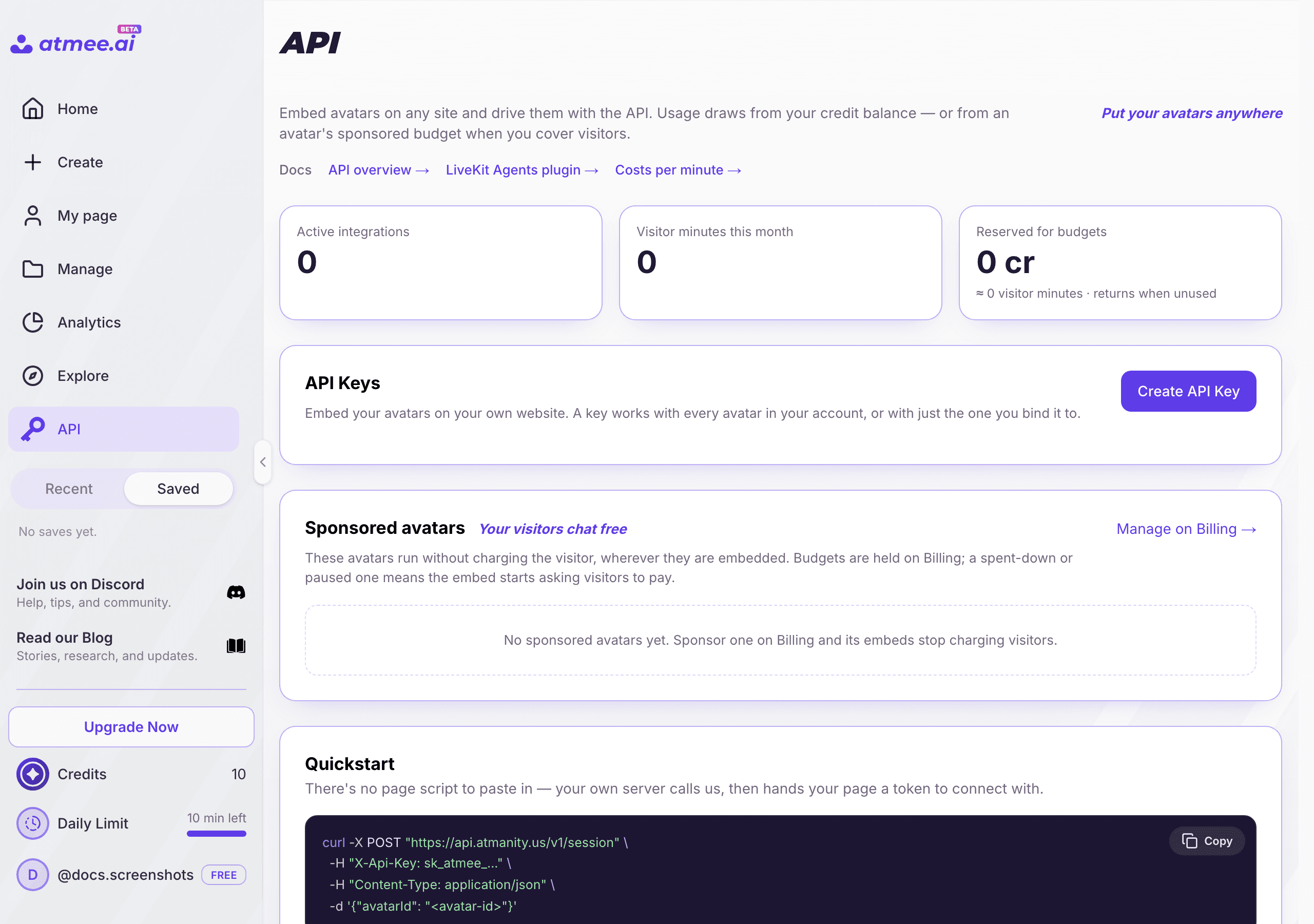
In Studio → API, click Create API Key. Name it after the app, keep the default sessions
scope, bind it to your avatar, and set a spend cap. Copy the secret, which is shown once, and put
it in a .env file next to your server as ATMEE_API_KEY. Scopes and caps are in
API keys.
Or, from a terminal, with the atmee CLI signed in as the account's owner or an admin. --out
writes ATMEE_API_KEY=... into .env and never prints the secret:
atmee keys create --name "quickstart" --avatar <avatar-id> --spend-cap 50 --out .envPick an avatar
List your avatars with the key:
curl https://api.atmanity.us/v1/avatars \
  -H "X-Api-Key: $ATMEE_API_KEY"
Each entry in items has an id, an engine and readyToChat. Pick one with
"readyToChat": true (with "engine": "v2" if your account has Atmee V2), and add its id to
.env as AVATAR_ID. In Studio, the id is the UUID in the avatar's editor address,
/studio/avatars/<id>/edit.
Start a session
Try the call once from your terminal. It starts a real, billed session:
curl -X POST https://api.atmanity.us/v1/sessions \
  -H "X-Api-Key: $ATMEE_API_KEY" \
  -H "Content-Type: application/json" \
  -d '{ "avatarId": "<avatar-id>", "maxDurationSeconds": 300 }'
A 201 means the avatar has already joined the room, usually 15 to 20 seconds after the call:
{
  "sessionId": "550e8400-e29b-41d4-a716-446655440000",
  "serverUrl": "wss://atmanity.livekit.cloud",
  "roomName": "rk-8f14e45f-ceea-467a-9f21-4c2f5b3a91cd",
  "userToken": "eyJhbGciOi…",
  "actualDurationSeconds": 300,
  "requestedDurationSeconds": 300,
  "durationCapped": false,
  "billingMode": "reserve"
}
Nobody joins this one, so it ends after 60 seconds as no_user_joined and costs nothing.
actualDurationSeconds, requestedDurationSeconds and durationCapped aren't always there:
requestedDurationSeconds only when you sent maxDurationSeconds, and actualDurationSeconds
only when the session has a length cap. A session with billingMode metered and no cap runs
until your credits or the key's spend cap run out, so don't start a countdown from a missing value.
| Field | Notes |
|---|---|
avatarId | Required. An avatar the key may use. |
maxDurationSeconds | Optional, 1 to 14,400; longer is refused with 422. Within that range it is cut to the key's, the plan's and the balance's limits; actualDurationSeconds is what you got. |
language | Optional. A BCP-47 tag that runs the session in the user's language instead of the avatar's own. Speech recognition and answers follow en, zh-TW and ja today; other tags fall back to detecting the language. |
metadata | Optional. Up to 50 properties stored with the session, such as your own user or order id. |
Write the server
Two routes: one starts a session and hands the page what it needs to join, the other ends it. The
key never leaves this file. Save it as server.mjs:
// server.mjs: the only place the key exists. Node 20.6+, no packages.
import { readFile } from "node:fs/promises";
import http from "node:http";

const API = "https://api.atmanity.us";
const { ATMEE_API_KEY, AVATAR_ID } = process.env;
const mine = new Set(); // sessions this server started

// Most errors are JSON with an `error` code, but a wrong key or an avatar the
// key may not use answers 401 or 403 as plain text or with no body.
async function read(r) {
  const text = await r.text();
  try {
    return text ? JSON.parse(text) : {};
  } catch {
    return { message: text };
  }
}
const errorCode = (r, body) =>
  typeof body.error === "string" ? body.error : `http_${r.status}`;

function atmee(method, path, body) {
  return fetch(API + path, {
    method,
    headers: { "X-Api-Key": ATMEE_API_KEY, "Content-Type": "application/json" },
    body: body && JSON.stringify(body),
  });
}

http
  .createServer(async (req, res) => {
    const json = (status, data) =>
      res
        .writeHead(status, { "Content-Type": "application/json" })
        .end(JSON.stringify(data));

    if (req.method === "GET" && req.url === "/") {
      res.writeHead(200, { "Content-Type": "text/html" });
      return res.end(await readFile("index.html"));
    }

    // Start. Every call is a billed session: in a real app, put this behind your sign-in.
    if (req.method === "POST" && req.url === "/api/session") {
      const r = await atmee("POST", "/v1/sessions", {
        avatarId: AVATAR_ID,
        maxDurationSeconds: 600,
      });
      const body = await read(r);
      if (!r.ok) {
        console.warn(
          "start failed",
          r.status,
          errorCode(r, body),
          body.message,
        );
        return json(r.status, { error: errorCode(r, body) }); // the code only, never the details
      }
      mine.add(body.sessionId);
      // Forward only what the page needs to join and to end. Never the key.
      const { sessionId, serverUrl, userToken } = body;
      return json(200, { sessionId, serverUrl, userToken });
    }

    // End: POST /api/session/<id>/end. Safe to call twice.
    const m = req.url.match(/^\/api\/session\/([0-9a-f-]{36})\/end$/);
    if (req.method === "POST" && m && mine.has(m[1])) {
      const r = await atmee("POST", `/v1/sessions/${m[1]}/end`);
      if (r.ok) mine.delete(m[1]);
      return json(r.status, await read(r));
    }

    res.writeHead(404).end();
  })
  .listen(3000, () => console.log("http://localhost:3000"));
The server ends only sessions it started itself, so nobody can end someone else's conversation by guessing an id. A real app ties each session to its own signed-in user.
Write the page
Save this as index.html next to the server. It loads livekit-client 2.22.3 from a CDN; with a
bundler, run npm i livekit-client@2.22.3 instead.
<video id="avatar" autoplay playsinline width="512" height="512"></video>
<audio id="voice" autoplay></audio>
<button id="start">Talk to the avatar</button>
<button id="stop" hidden>End</button>
<p id="status"></p>

<script type="module">
  import {
    Room,
    RoomEvent,
    Track,
  } from "https://cdn.jsdelivr.net/npm/livekit-client@2.22.3/+esm";

  const $ = (id) => document.getElementById(id);
  let room, endUrl;

  function end() {
    if (!endUrl) return;
    navigator.sendBeacon(endUrl); // your server ends the session, even while the page closes
    endUrl = null;
    room?.disconnect();
    $("stop").hidden = true;
    $("start").hidden = false;
    $("status").textContent = "Ended.";
  }

  $("start").onclick = async () => {
    $("start").hidden = true;
    $("status").textContent = "Connecting…"; // the start takes 15 to 20 seconds
    const res = await fetch("/api/session", { method: "POST" });
    const s = await res.json();
    if (!res.ok) {
      $("status").textContent = `Couldn't start (${s.error}).`;
      $("start").hidden = false;
      return;
    }
    endUrl = `/api/session/${s.sessionId}/end`;
    room = new Room();
    room.on(RoomEvent.TrackSubscribed, (track) => {
      // The avatar publishes one video and one audio track.
      track.attach($(track.kind === Track.Kind.Video ? "avatar" : "voice"));
    });
    room.on(RoomEvent.Disconnected, end);
    await room.connect(s.serverUrl, s.userToken); // join within 60 seconds
    await room.startAudio();
    await room.localParticipant.setMicrophoneEnabled(true);
    $("status").textContent = "Say hello.";
    $("stop").hidden = false;
  };

  $("stop").onclick = end;
  addEventListener("pagehide", end);
</script>
Run it
node --env-file=.env server.mjsOpen http://localhost:3000, click Talk to the avatar, allow the microphone, and say hello.
Browsers need a click first
Browsers block sound and the microphone until the user does something on the
page, so ask for the microphone only after the click. If the session started
long after the click (Safari), room.canPlaybackAudio is false: show a "tap
to hear" button that calls room.startAudio(). The avatar needs no camera.
For about its first 5 seconds in the room the avatar hears the user as silence, so words spoken right away are lost. Show "Say hello" once its audio arrives.
End the session
Your server ends it with POST /v1/sessions/{id}/end: the room closes, the avatar leaves, and
billing stops.
curl -X POST https://api.atmanity.us/v1/sessions/550e8400-e29b-41d4-a716-446655440000/end \
  -H "X-Api-Key: $ATMEE_API_KEY"
{
"sessionId": "550e8400-e29b-41d4-a716-446655440000",
"status": "completed",
"endedAt": "2026-11-04T16:42:10Z",
"alreadyEnded": false,
"endReason": "ended_by_api"
}- It's safe to call twice. Ending a session that already ended answers
200withalreadyEnded: true, so retry503 session_unavailable(afterRetry-After) and500 finalize_failed. - It also ends on its own when the user leaves the room (
user_left), atactualDurationSeconds(max_duration), or when your credits run out. Ending it yourself still stops billing the moment your app is done. - To see what it cost, call
GET /v1/sessions/{id}:status,endReason,billedSecondsandchargedMicrocredits(100 microcredits are 1 credit). You're billed only while both the user and the avatar were in the room.
When the start fails
Most errors come back as {"error": "<code>", "message": "..."}. Two come as plain text or with no
body: 401 for a wrong or revoked key, and 403 for an avatar the key may not use. A request the API
can't validate (422, or 400 for broken JSON) answers {"code": <number>, "message": "..."}.
The server above handles all three. Log the message on your server; show the user only that it
didn't work.
| Status | Code | What to do |
|---|---|---|
503 | no_capacity | No rendering capacity right now. Wait Retry-After seconds and start again. Nothing is billed. |
409 | avatar_busy | The avatar is already in a conversation. End the other one, or use another avatar. |
409 | avatar_not_ready | An Atmee V2 avatar has no take serving yet. Wait until readyToChat is true. |
402 | insufficient_credits, api_key_spend_cap_reached, concurrent_session_limit | A limit was hit. Don't retry; log which one. The user only needs to hear it's unavailable. |
403 | The avatar isn't one this key may use. | |
401 | The key is wrong or revoked. |
Every code is in the API reference, and the usual fixes are in Troubleshooting.
What's next
Your app and the avatar can do much more while the session runs: send it state and events, let it call your app's tools, show it files, or give it an agenda. See What your app can do in the room.
Next steps
API keys
A key is a secret your server sends as X-Api-Key. You choose what it may do, which avatars it may use, and how much it may spend.
Create an avatar
Two ways to create an avatar with the API: send a JSON manifest that points at your files, or upload everything in one zip. Either builds Atmee V2 or Atmee V1.